Best household chore app for families — what actually matters in 2026
An honest buyer's guide. What to look for in a family chore app, which features are filler, and how to pick one your household will still use in month three.
Every "best chore app" roundup online reads the same. Generic pros and cons, a screenshot, a pricing bullet, and a conclusion that helps nobody decide anything.
This one is written by a team that's built a chore app and watched what makes households actually stick with one. We'll name competitors. We'll tell you when they're the right pick. And we'll tell you what features are marketing fluff you can ignore.
Here's how to choose a family chore app that survives the third month.
The features that actually matter
1. Per-member assignment, not a shared checklist
If everyone in your house can check off any task, you don't have a chore app — you have a group to-do list. Which means nobody owns anything, and the same two people end up doing the same things anyway.
Look for: the ability to assign specific chores to specific people, and see at a glance who is responsible for what.
Avoid: apps where everything lives in one big pool. You'll recreate the same dynamic that already isn't working.
2. Fairness that's visible, not implied
The biggest fight in most households isn't "who forgot to do X" — it's "I always do more." You want an app that can show the split. Numbers, not vibes.
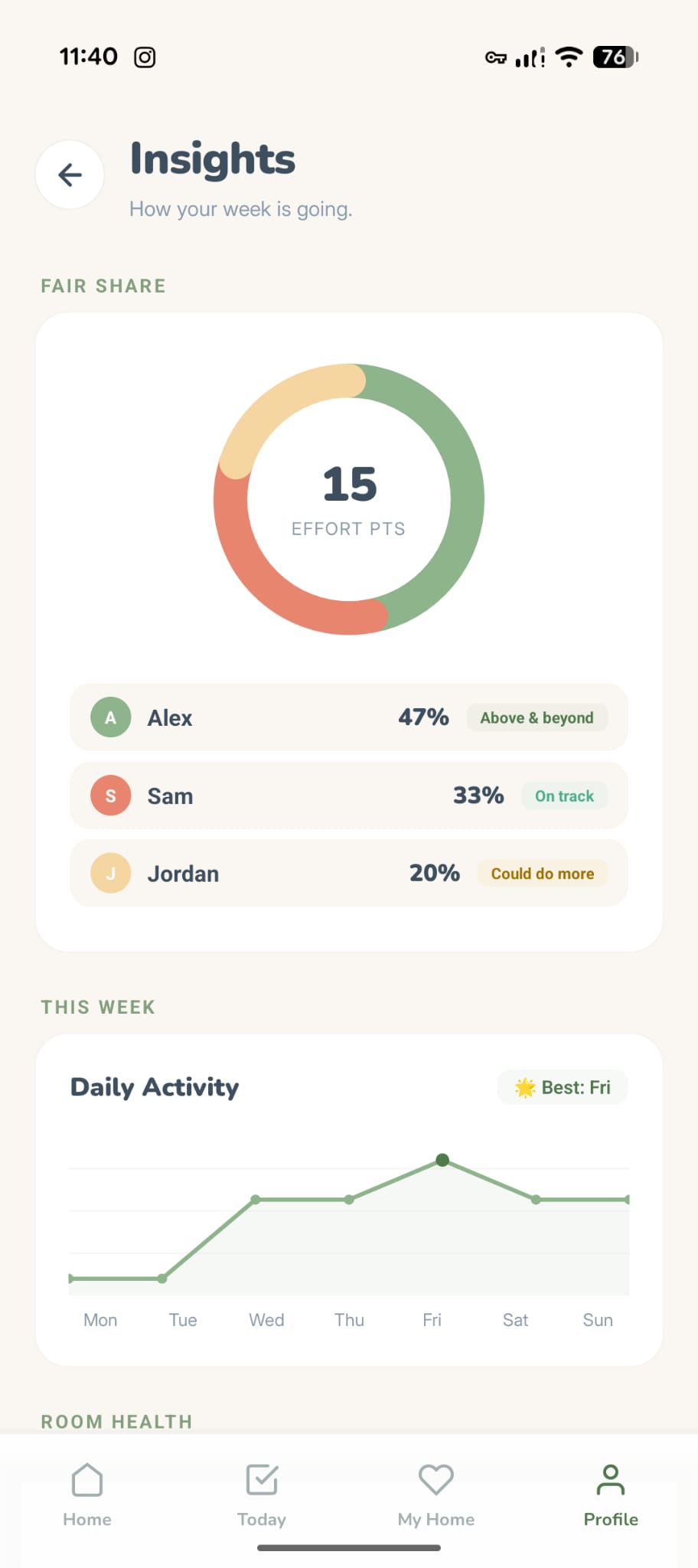
Look for: an insights or effort view that shows time or weighted contribution per person, not just "tasks completed" (which punishes the person doing the short quick chores).
Avoid: leaderboards that incentivise people to grab easy tasks to inflate their count. That's worse than nothing.
3. A reward loop, especially for kids
If you've got kids, this is the single highest-leverage feature. Kids engage with chores when the reward is visible and collectible. Abstract rewards ("screen time later") don't survive the first bad day. Concrete ones do.
Look for: a coin or token economy with something real to spend them on. Furniture, stickers, characters — anything that persists and stacks.
Avoid: allowance trackers that only reward with cash. Useful for older teens; dead weight for anyone under 10.
4. Reminders that don't nag you into hating the app
Notification fatigue kills more chore apps than any other single thing. You want the app to be present enough to keep things moving but not so aggressive you mute it.
Look for: a single daily summary plus gentle behind-the-scenes re-planning. Not ten reminders a day.
Avoid: apps that send you a notification for every individual task. You will mute them in three days.
5. Handles the bad days
Life happens. Someone gets sick, you travel, you just have a week where the whole thing collapses. A good app absorbs that. A bad one punishes it.
Look for: a vacation mode or pause function that freezes everything without breaking streaks or snowballing overdue piles.
Avoid: any app with "you missed 3 days" shame mechanics. No app should ever colour a task red. You are a grown adult, not a failing student.
6. A way to clean together
This is underrated. Cleaning alone is lonely. Cleaning with someone else — even virtually — is genuinely faster and more motivating. It's called body doubling, and it's one of the most research-backed productivity techniques for anyone with executive dysfunction.
Look for: a feature that lets household members work on a shared session, visible in real time.
Avoid: pretending this doesn't matter because you don't have ADHD. It does, and you'll use it more than you think.
Features that are marketing filler
These sound nice on a feature list and contribute almost nothing in real use:
- AI meal planning bolted onto a chore app. These are never as good as dedicated meal-planning apps. Skip it.
- "Voice input" for chores. The bottleneck isn't typing speed. It's doing the chores.
- Social feeds. You do not need an Instagram for your dishwasher.
- Cross-household leaderboards. If you care whose household is "cleaner" than your cousin's, we can't help you.
- NFT rewards. No.
When each popular app is the right pick
Quick scan — then a paragraph on each below.
| App | Best for | Pick it if... |
|---|---|---|
| Tidywell | ADHD households, families with kids, fairness disputes | You need a real reward loop, visible effort split, or body doubling |
| Sweepy | Solo or couple, neurotypical, minimalist | You want a clean chore-by-room tracker and nothing more |
| OurHome | Young kids (under 8), cash/treat rewards | A points total is enough reward for your kids |
| Cozi | Schedule-first families | Calendar chaos is your main pain, chores are secondary |
| Homey | Kids + allowance | You want chores tied directly to pocket money |
| Tody | Single-person tracker | You live alone and want smart re-surfacing |
| Flatastic | Student flats, roommates | You split bills as well as chores |
OurHome
Solid free option. Good if you want a simple points-and-rewards system and aren't precious about design. Weakest point: no real reward loop beyond a points total. Works best for families where kids are under 8 and cash/treats are already the currency.
Cozi
Not really a chore app — it's a family calendar with a chore feature bolted on. Pick it if your main pain is schedule chaos and chores are secondary.
Homey
Strong if you want to tie chores directly to allowance money. Weakest for neurodivergent households — the currency is abstract dollars, which flattens a lot of the motivational detail.
Sweepy
Best minimalist, neurotypical-first tracker. If you want a lean chore-by-room list and nothing else, Sweepy is the most mature pick. Our honest comparison is here.
Tody
Great single-person tracker. Falls down when you try to share with multiple household members — it wasn't built for it.
Flatastic
Good for student flats and roommate setups. Not really built for families.
Tidywell
Us. We're best when:
- You've got kids and need a reward loop that actually holds their attention
- Anyone in the household has ADHD, autism, or executive dysfunction
- You've been burned by guilt-based streak apps
- You want visual fairness data, not just task counts
- You want to clean together sometimes, even with a remote partner or adult child
We're probably not the right pick if you want a minimalist single-user checklist. Sweepy or Tody is better for that.
What to actually do next
- Write down the three things your household argues about most — not chore-app features, but real friction. ("Who took out the bins last." "Kids never do X." "I do all the laundry.")
- Map each one to the feature list above.
- Pick an app where at least two of your three problems are explicitly addressed by the feature set. Not just "the app has a section for that." Actually solves it.
- Give it two weeks of real use, not one evening of setup.
Why Tidywell might be the one
If your household has even one of the following, Tidywell is probably the right fit:
- Kids who lose interest in chores within a week. Our virtual dollhouse is a visible, collectible reward loop. Coins stack. Furniture persists. The motivation renews automatically.
- Adults with ADHD. Warm amber instead of red. Vacation mode. AI task breakdown for "clean the kitchen" overwhelm. A Focus Mode with lo-fi that one user called "the only way I've ever started cleaning without crying."
- Arguments over fairness. Fair-Share Insights show effort-weighted contribution, so "I do more" either has numbers behind it or it doesn't.
- A remote or travelling partner. Live Sprints let you clean together on a shared timer even if one of you is in a hotel.
- A shared shopping list constantly going missing. Tidywell has one built in, with per-aisle grouping.
One subscription covers the whole household. Free forever for small homes (up to 5 rooms), no account needed to start.
Before you commit to any of these, see if Tidywell fits. If it doesn't, Sweepy and Cozi are both solid runner-ups and we're genuinely happy to point you there. The worst outcome is you download yet another app and abandon it in week two. Pick deliberately.
Tidywell launches on iOS and Android first to the waitlist. Join the waitlist — we'll email you the moment the apps go live.